Study tools
Quizlet alternatives: choose by study workflow and the cost of moving

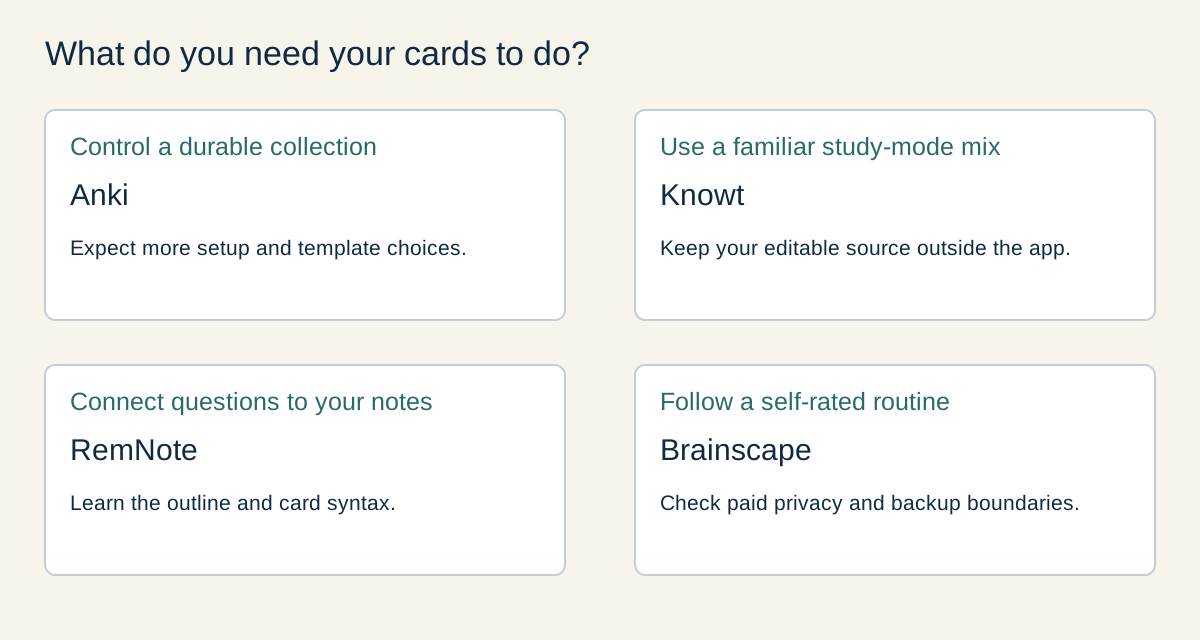
My starting choice is Anki for control over a long-lived personal deck, Knowt for a familiar free study-mode mix, RemNote for keeping notes and cards together, and Brainscape for a simpler confidence-rated review routine. Stay with Quizlet if it already fits your class and study needs. Before moving, check a small set in both directions: easy import does not guarantee an editable export later.
The shortlist: four different reasons to switch
I would choose the revision routine first, then the app. A long catalogue of modes matters less than being able to answer useful questions, check mistakes and return to difficult material. The four options below serve different needs; their order is a reading order rather than a measured performance ranking.
This comparison uses the providers’ current documentation for plans, imports and exports. The original sample below keeps the same eight question-and-answer pairs across text formats, so you can check a move without risking your main deck. It is a preparation resource, not a claim that all four apps have completed a successful account-level import test.
- Anki: control and a portable personal collection
- Knowt: a familiar free study-mode mix
- RemNote: cards connected to your notes
- Brainscape: a confidence-rated review routine
| Option | Best fit | Useful free starting point | Main tradeoff |
|---|---|---|---|
| Anki | A personal collection you expect to maintain for years | Desktop app and AnkiWeb sync | More setup; the official iOS app is a separate purchase. |
| Knowt | Several study modes for your own sets | Student flashcards and study modes | Its documented export is PDF; keep your editable source. |
| RemNote | Turning structured notes into retrieval questions | Unlimited notes and flashcards | More structure to learn; advanced PDF/image features have limits. |
| Brainscape | A straightforward self-rated review routine | Creating and studying text cards | Private decks and documented personal backup export need Pro. |
1. Anki: for control and a portable personal collection
Anki is my first shortlist option when keeping a reusable collection matters more than matching Quizlet’s layout. Its desktop workflow supports editable note fields, card templates and review scheduling. The desktop app is free, and AnkiWeb provides free synchronisation; the official AnkiMobile app for iOS is a separate purchase. Follow the official project’s platform links so you do not buy an unrelated similarly named app.
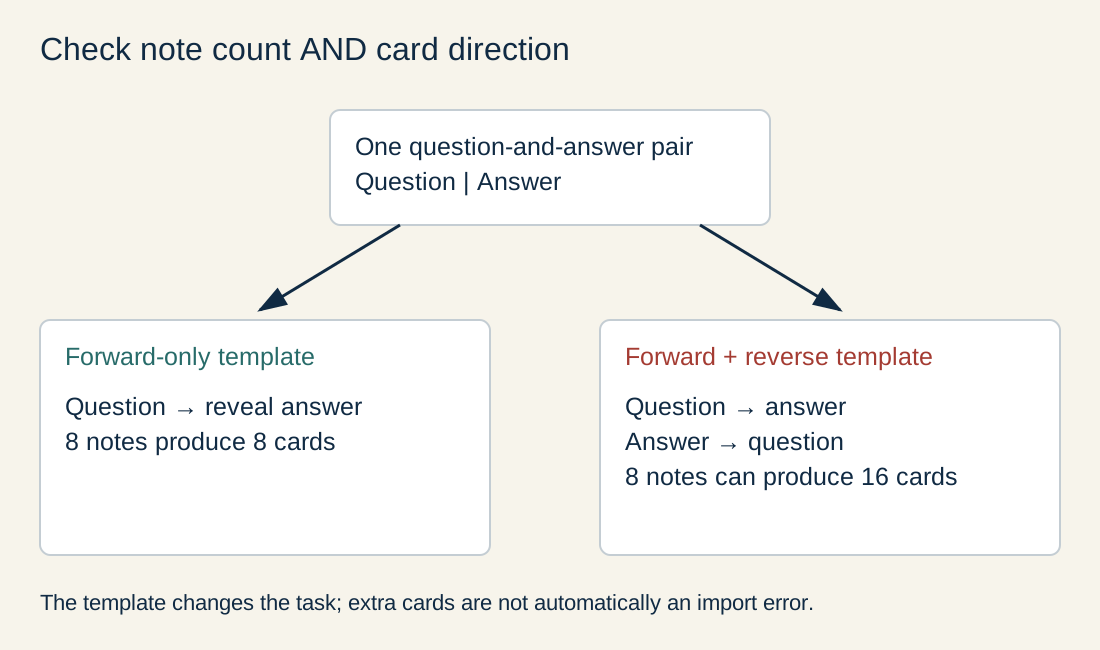
The practical advantage is ownership of a structured source. The Anki manual documents UTF-8 text imports with separators such as tabs and commas, field mapping and an import preview. Our tab-separated sample has one question and one answer per line. In a fresh deck, use a basic forward card first; a reversed-card template can create more than eight cards from eight notes.
The limitation is setup and maintenance. You need to understand the difference between a note and a card, decide what counts as a correct answer and avoid turning the review queue into an unmanageable backlog. It is a poor switch if you only need a shared class set today and do not want to learn those controls.
For file structure and field mapping, consult the Anki text-import manual. Keep an untouched source copy before importing into an existing collection, where matching first fields can affect duplicate handling.
2. Knowt: for a familiar free study-mode mix
Knowt is worth shortlisting if your reason for leaving Quizlet is access to study modes rather than deep scheduling control. Its student free-plan guide lists unlimited sets and notes, with Learn, Practice Test, Spaced Repetition, Match and Flashcards available on your own sets. AI summaries and some exam-preparation features have separate limits.
The same guide lists student Ultra at US$24.99 monthly or US$149.99 for a year. Twelve monthly payments would total US$299.88; that does not make the annual plan sensible if you only need the free modes or a short study period. Prices are the published US figures checked on 8 November 2026; tax, region and checkout offers may differ.
Portability is the main caution. Knowt documents manual text imports and a Quizlet route, but its export instructions describe PDF. A printable PDF is useful for reading offline; it is not equivalent to an editable two-column deck backup. Do not assume text, images, audio and review history will all move back out.
Read the student free-plan boundaries and the export guidance in the sources before relying on a feature. For a small trial, keep the source questions outside the app and compare them with the imported cards.
3. RemNote: for cards connected to your notes
RemNote fits a learner who wants a question to stay beside the explanation it came from. Instead of maintaining a separate stack of disconnected cards, you can work from a structured outline. That makes it a different decision from choosing the most Quizlet-like screen.
Its published Free plan includes unlimited notes and flashcards. The pricing page lists three annotated PDFs and five image-occlusion cards in the free starting offer. Pro is US$96 billed yearly, presented as US$8 a month; Pro with AI is US$216 billed yearly, presented as US$18 a month. Those are annual commitments, not monthly checkout quotations. Start free unless a specific paid feature removes a real obstacle.
RemNote documents a basic forward-card syntax using a question, two greater-than signs and an answer. The companion text file below applies that syntax to the same eight questions. Its export help describes text, Markdown, HTML and an Anki flashcards-only package. In the latter, ordinary notes without flashcards are omitted, and hierarchy can be carried into the card context.
The text-to-flashcard syntax guide is useful when preparing a small sample. The tradeoff is learning an outline and card-creation system: if all you need is a quick isolated vocabulary list, this may add unnecessary structure.
4. Brainscape: for a confidence-rated review routine
Brainscape belongs on the shortlist if you want a straightforward routine built around rating how well you knew the answer. Its free offering includes creating and studying text flashcards. Confidence still needs an honest check against the answer; feeling familiar with a term is not the same as being able to explain it unaided.
Its official US App Store description lists Pro at US$19.99 monthly or US$95.99 annually. These are channel-specific figures, not a promise of the same web or regional price. The provider’s help assigns private-content controls, multimedia and advanced options to Pro; its backup article also documents deck export for Pro users.
That paid export boundary matters if you are building a collection you expect to move again. Brainscape describes importing Quizlet material through exported text or CSV, rather than a guaranteed direct transfer. Its mobile help says downloaded cards can be studied without a connection after initial sign-in and download; plan that download before travelling.
The Brainscape backup guidance explains the documented export condition. Choose it for the review routine, rather than assuming a free account gives every editing, privacy and backup feature.
When staying with Quizlet is the better choice
Keep Quizlet if your teacher distributes sets there, collaboration already works and your current access covers the modes you actually use. Switching just before an assessment can cost more study time than it saves. An app change is worthwhile when it solves a named problem such as a recurring charge, a blocked workflow or an unsuitable review routine.
Quizlet’s own export instructions say creators can export the terms and definitions of their own sets through the website. Copied sets cannot be exported, and image exports are unavailable. Check ownership and content limits before planning a move; do not treat another provider’s claim about Quizlet as the controlling policy.
A public set is not automatically yours to republish. Use your own questions or material you have permission to transfer. Do not use an extension or another account to work around access controls. If a necessary shared set cannot move legitimately, it may be better to keep that class workflow and build your own separate revision questions.
Try the same eight-card sample before moving your collection
The original sample uses simple questions about source checking, not a real examination paper. It includes punctuation, an accented word and a Thai word so you can check whether text survives intact. It deliberately excludes pictures, audio and personal data; a successful text check says nothing about those features.
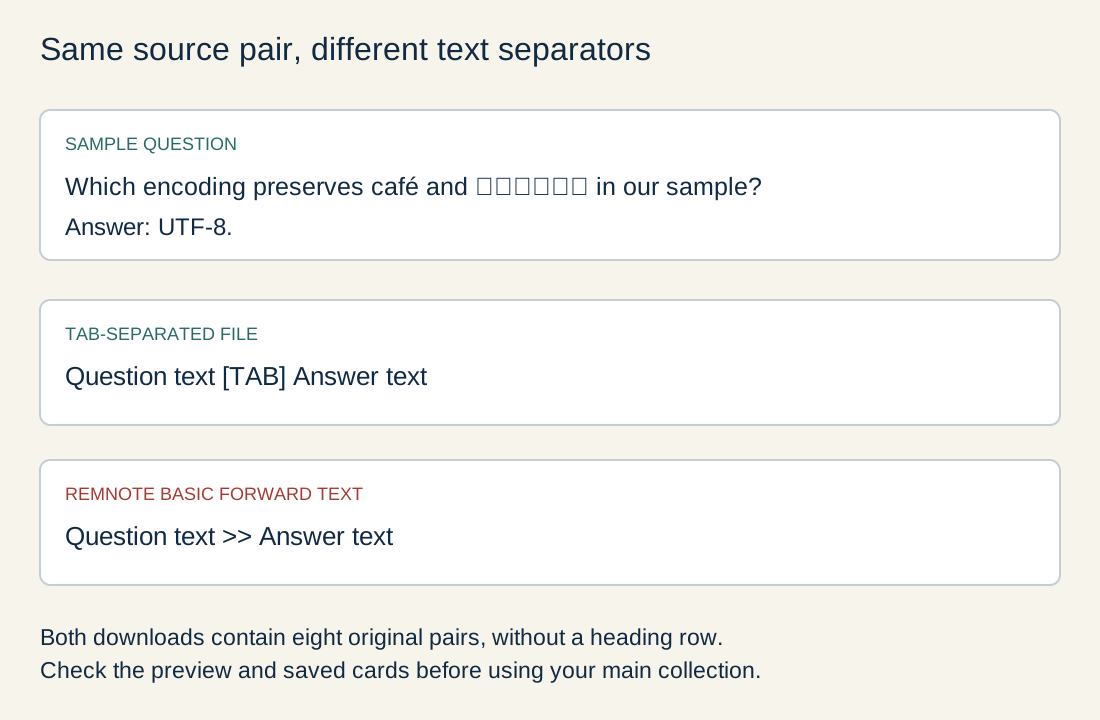
Download the tab-separated eight-card source (.txt). It contains exactly eight lines with a question and answer separated by a tab. There is no heading row to turn into an accidental extra card.
Download the equivalent RemNote text (.txt). This uses the documented basic forward-card syntax. It preserves the same question-and-answer wording; it is not an exported RemNote account or a finished Anki deck package.
Use a separate practice deck or document first. Compare the first and last pair, all eight answers, the accent and Thai text, and any punctuation. Check the import preview before saving. Then export the practice material and see whether you can recover editable questions and answers, not merely a PDF.
Do not delete your original deck after an import count looks right. Text content, note-to-card mapping, media, tags, shared access and review history are separate checks. A fresh import can restart scheduling even when all question text is present. Keep the original until the replacement works for your actual study routine.
| Check | What to compare | What a mismatch means |
|---|---|---|
| Eight question-and-answer pairs | No missing, split or extra heading row | Inspect separators and field mapping. |
| Accents and Thai text | café and สวัสดี remain intact | Check UTF-8 and the saved file. |
| Forward direction | Question first; answer hidden until recall | Check the card template or direction. |
| Editable round trip | Questions and answers recover as text | A PDF-only export is not the same backup. |
Check privacy, accessibility and offline needs separately
Use non-sensitive sample material while evaluating a cloud service. Do not upload classmates’ details, restricted teaching material or confidential work without permission. Check whether a deck is public, private or shared with a class; those are content-visibility settings, not a complete assessment of how a provider processes account data.
The differences are practical. Brainscape documents private cards as a Pro feature. Knowt’s sharing guide distinguishes student access options from teacher-only paid sharing controls. Anki can keep a desktop collection local; choosing to synchronise it is a separate step. None of these facts alone establishes suitability for your school or workplace.
For accessibility, try your actual device, keyboard, screen reader and text size before committing. Check whether the answer can be revealed without a mouse, whether focus remains clear and whether any important diagram has a usable text alternative. Offline study also needs a real device check; cached web content is not a promise that every feature works without a connection.
Final verdict: solve one problem before moving everything
Choose Anki for control over a durable personal deck, Knowt for a free study-mode mix, RemNote for connected notes and questions, or Brainscape for a confidence-rated routine. There is no universal winner, and staying with Quizlet can be the sensible choice when it already meets your needs.
My next step would be one practice deck, one revision session and one editable-backup check. Pay only when the feature you need is outside the free plan and the full billing commitment fits your budget. Whichever tool you choose, answering before revealing the card and correcting mistakes matters more than collecting another library of unreviewed questions.
Sources and image credits
- Anki project: desktop and platform information (accessed 8 November 2026)
- Anki manual: text files and import mapping (accessed 8 November 2026)
- Quizlet: exporting your own sets (accessed 8 November 2026)
- Knowt: student Free and Ultra plan limits (accessed 8 November 2026)
- Knowt: manual and Quizlet imports (accessed 8 November 2026)
- Knowt: PDF export (accessed 8 November 2026)
- Knowt: student and teacher sharing settings (accessed 8 November 2026)
- RemNote: Free and annual paid plans (accessed 8 November 2026)
- RemNote: text import syntax (accessed 8 November 2026)
- RemNote: export formats and limitations (accessed 8 November 2026)
- Brainscape: free and Pro feature boundaries (accessed 8 November 2026)
- Brainscape: US App Store plan description (accessed 8 November 2026)
- Brainscape: importing other decks (accessed 8 November 2026)
- Brainscape: personal backup export (accessed 8 November 2026)
- Brainscape: mobile offline study (accessed 8 November 2026)
Access dates are recorded beside each source. Please report a source or factual concern.