Digital learning
Skillshare for creative learning: judge the project, not the playlist
For a short creative project, Skillshare is worth considering when a named class supplies the next technique you need and you will make and revise your own work. For the design example here, I would choose it for a focused layout exercise; choose a broader course or tutor-supported option when you need a sequence of assignments or guaranteed critique.

Key takeaways
- Inspect the project brief before subscribing.
- Budget time for making and revision as well as watching.
- A project gallery is not a promise of individual teacher feedback.
- Judge the price against realistic finished work, not catalogue size.
The basis of this assessment
This is an editorial assessment of the named class’s public outline, project brief and transcript, with a documentation check on 23 September 2026 and retained public captures from 18 September. It does not report my personal course completion, a paid enrolment, submitted work or measured teacher-response times. The independent practice brief below is a teaching exercise.
A specific class to inspect
Skillshare: inspect the lesson sequence
Swipe across the screenshot to inspect the detail, or open the full-size version below.

The outline moves from five design principles to a combined layout demonstration. It lists nine lessons and about 36 minutes of video; project work takes additional time.
The official project asks you to make a layout
Swipe across the screenshot to inspect the detail, or open the full-size version below.
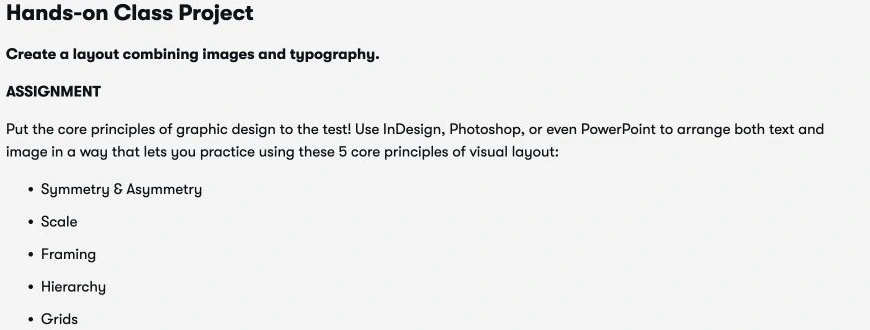
The official brief asks learners to combine images and typography, using symmetry/asymmetry, scale, framing, hierarchy and grids. It allows software such as InDesign, Photoshop or PowerPoint.
Graphic Design Basics: Core Principles for Visual Design, with Ellen Lupton and Jennifer Cole Phillips, provides a concrete starting point. Its public outline covers balance, scale, framing, hierarchy and grids, followed by a layout demonstration. The transcript says learners can use a familiar design tool rather than requiring one particular application.
That makes the class worth inspecting for a learner who wants to understand visual decisions. It does not by itself show how well you will apply them. I would check the task, available materials and the cost of any tools before starting. A short video runtime also leaves out your own experimentation and revision.
The nine published lesson times sum to 36 minutes 10 seconds: 1:32, 4:56, 2:37, 3:10, 5:11, 4:51, 11:01, 2:16 and 0:36. This is a calculation from the public outline checked on 23 September 2026, not timed playback or total learning time. Making and revising the layout require additional time.
Try this original creative-learning brief
Create a one-page notice for an imaginary community repair workshop. Use only this information: “Repair afternoon”, “Saturday 17 October”, “2 to 4 pm”, “Community hall”, and “Bring one small item”. These are invented event details. Use a tool you already know or paper; no paid design application is necessary for this exercise.
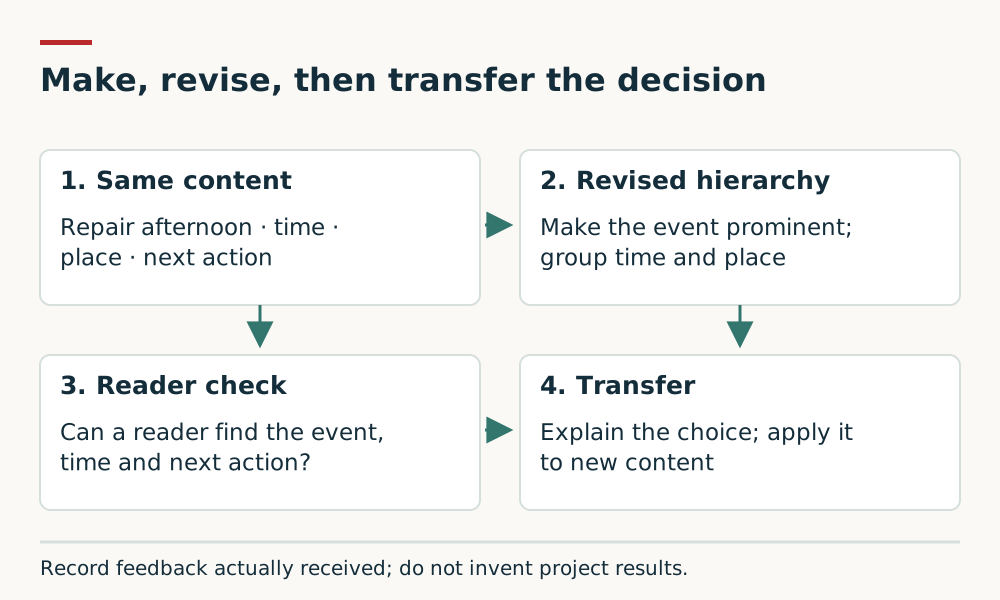
Make one version before studying. Then choose one principle from the class and produce a second version. For example, make the event name most prominent and group the time with the place. Keep the words the same so you can explain which design decision changed. This is our independent exercise, not the class’s official assignment.
Evaluate the work you produce
Ask someone to locate the event, time and place without explaining your design first. Record what they actually say; do not invent a success rate. One person’s reaction is useful feedback, not proof that the design works for every audience.
| Check | Evidence to keep | Next revision |
|---|---|---|
| Purpose | Can a reader identify the event and the action to take? | Remove competing emphasis. |
| Hierarchy | Which item would a reader notice first, second and third? | Adjust relative size, position or spacing. |
| Grouping | Are time and place easy to find together? | Bring related details closer and separate unrelated groups. |
| Readability | Can the notice be read at its intended size? | Inspect contrast, type size and crowded lines. |
| Transfer | Can you apply the same principle to a different notice without copying? | Make a new layout with different content. |
What I would check about feedback
Look for a clear project description and evidence that discussion is useful for the skill you want. A large number of projects or comments does not establish that the instructor will review your submission. If personal critique is essential, compare a class with explicitly included feedback or a tutor-led workshop.
Keep the first version, the revision and a short explanation of your choices. The useful outcome is being able to make and defend a decision yourself. A recognisable imitation of the teacher’s example is an intermediate step, not the endpoint.
When I would choose another route
For the same beginner design goal, I would choose the Skillshare example when one compact layout project is enough. I would choose CalArts’ Fundamentals of Graphic Design on Coursera when I want a broader progression through image, type, colour and composition. The broader syllabus asks for a larger commitment; it does not prove better instruction.
For a single notice, begin with the free original brief below using paper or an existing tool. It gives you a concrete task before any subscription, but supplies neither instructor teaching nor guaranteed feedback. If critique from a qualified teacher is essential, compare a workshop or course that explicitly includes it.
The CalArts course outline is the basis for that curriculum comparison. No head-to-head course completion study was performed. My recommendation concerns fit and scope, not measured learning gains or an overall price winner.
Membership value and billing
Skillshare directs learners to regional pricing. Check your own full charge and renewal date instead of relying on a universal price. Trials require payment details and become paid subscriptions unless cancelled. Its help page gives Account Settings, then Membership & Payments, as the cancellation route; refund eligibility is restricted and depends on the purchase.
My calculation is simple: full subscription cost plus necessary materials, divided by the number of worthwhile projects you can realistically finish. If a hypothetical membership costs £120 and you finish three projects, the subscription component is £40 per project. At one project it is £120. This is an illustration, not a Skillshare price quote.
Before subscribing, choose the first project and two study sessions in your calendar. If you cannot do that yet, begin with a library resource or a free tutorial and reconsider after completing something.
My recommendation
I would consider a Skillshare membership for a learner who wants to practise a creative skill through several suitable classes and is willing to seek and use feedback. I would choose a different route for an externally recognised qualification, guaranteed individual critique or a single small task already covered by a good free resource.
If you also want a longer structured course, compare Coursera and Skillshare for the same learning goal rather than assuming one platform is best for every kind of learner.
Setup, learner access and privacy checks
For the named design class, allow for the project materials and software as well as membership. Public outlines and captures can help compare the task; they do not establish ease of setup for every learner.
Check current device requirements, access restrictions, caption provision and whether the feedback you need is included. This assessment does not validate an age range, parental controls, assistive-technology support or private handling of submitted projects.
These are material checks before purchase, not features independently verified by this update. Existing captures and product-source checks retain their stated dates; this editorial update adds suitability and evidence limits. If a required condition cannot be confirmed, choose a different resource or resolve it before paying.
Sources and further reading
- Skillshare: Graphic Design Basics public class outline and transcript (accessed 23 September 2026)
- Skillshare Help: subscriptions, regional pricing, cancellation and refunds (accessed 23 September 2026)
- Coursera: CalArts Fundamentals of Graphic Design outline (accessed 23 September 2026)
Access dates are recorded beside each source. Please report a source or factual concern.