Digital learning
Coursera or Skillshare? Start with what you want to make or understand
For the specific goal of improving one simple layout, my starting choice is the focused Skillshare class. For a broader sequence in image-making, typography, colour and composition, I would choose the CalArts course on Coursera. For one small notice without a credential requirement, try the free exercise first. These are curriculum-fit judgments, not results of a head-to-head learning trial.

Key takeaways
- Both platforms can support creative learning.
- Compare actual course outlines, not platform stereotypes.
- Video runtime is not total learning time.
- Choose one course and one demonstrable outcome before buying access.
How this comparison was made
This comparison uses public course outlines checked on 23 September 2026 and retained captures from 18 September. It does not claim my personal completion of both courses, measured learning gains or tested feedback speed. Recommendations follow the stated project and curriculum scope; the study plans are editorial examples.
To make the comparison useful, I chose one shared goal: understanding visual design well enough to improve a simple notice. This avoids comparing an unrelated professional qualification on one platform with a short creative class on the other.
Two concrete options for the same subject
Coursera: inspect the sequence of practice
Swipe across the screenshot to inspect the detail, or open the full-size version below.
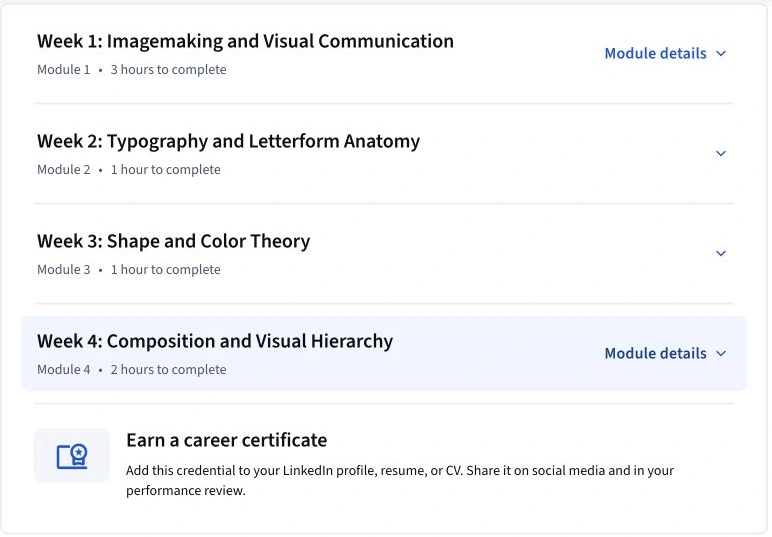
The four visible modules cover imagemaking, typography, shape and colour, and composition. Compare these tasks with Skillshare’s principles and layout project, rather than treating unlike duration estimates as equivalent.
Skillshare: inspect the lesson sequence
Swipe across the screenshot to inspect the detail, or open the full-size version below.

The outline moves from five design principles to a combined layout demonstration. It lists nine lessons and about 36 minutes of video; project work takes additional time.
The official project asks you to make a layout
Swipe across the screenshot to inspect the detail, or open the full-size version below.
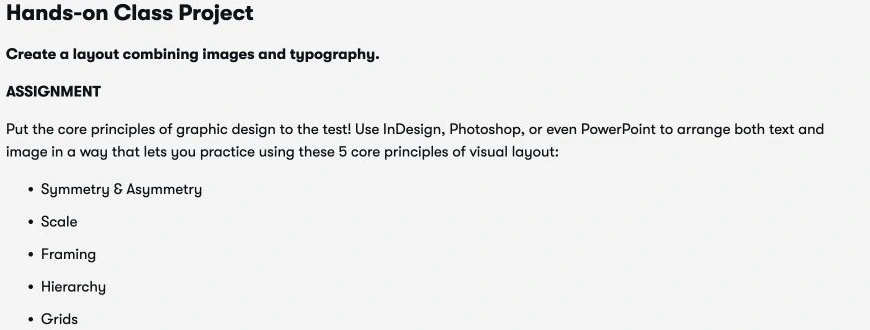
The official brief asks learners to combine images and typography, using symmetry/asymmetry, scale, framing, hierarchy and grids. It allows software such as InDesign, Photoshop or PowerPoint.
The Coursera outline emphasises design principles rather than teaching a particular software package. Skillshare’s public transcript likewise allows familiar tools. Neither example should be chosen solely because you want button-by-button training in a specific application.
The nine published Skillshare lesson times total 36 minutes 10 seconds. Coursera describes a broader four-module course with assignments. Video runtime and a provider’s total workload estimate measure different things, so dividing one by the other would not show which platform teaches faster. Neither figure includes a measurement of this reader’s practice and revision.
| Question | Coursera example | Skillshare example |
|---|---|---|
| Course | CalArts: Fundamentals of Graphic Design, taught by Michael Worthington. | Graphic Design Basics: Core Principles for Visual Design, with Ellen Lupton and Jennifer Cole Phillips. |
| Visible structure | Four modules; the page lists six assignments and an AI-grading notice. | Short lessons on design principles followed by a layout demonstration and project. |
| Likely task to inspect it for | A broader sequence of image, type, colour and composition exercises. | A focused introduction you can apply to one layout. |
| What to verify | Current assessment format, access and certificate requirements. | Project requirements, suitable tools and available feedback. |
What makes the comparison fair enough to use?
Both examples can help a beginner reason about a layout, but their scope differs. Compare the first useful outcome: produce a notice and explain its hierarchy. Then ask whether you want more image-making and typography assignments after that. A wider syllabus is a reason to choose more study, not evidence that the shorter course is poor.
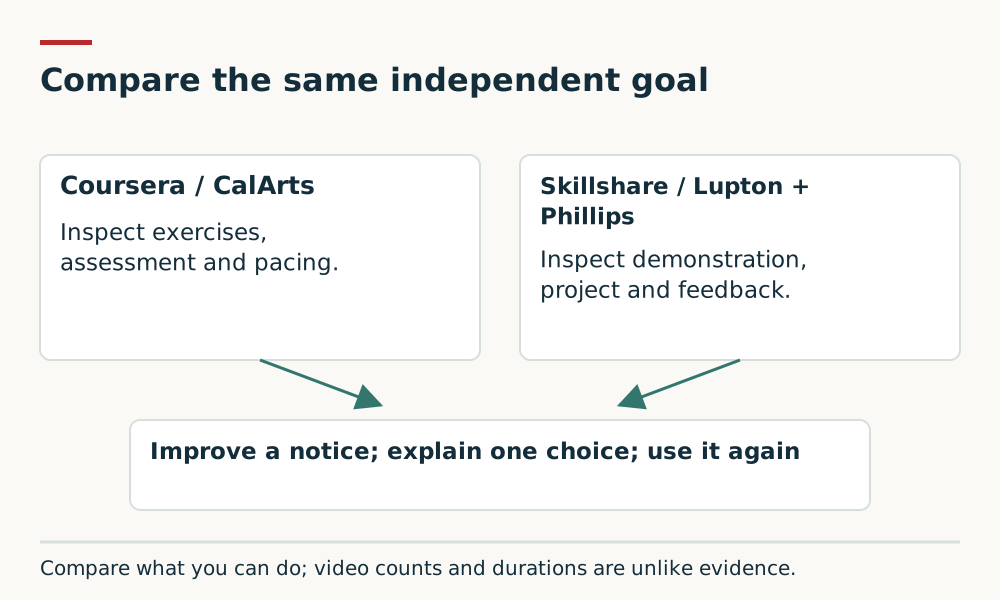
For cost, compare full access charges in the same currency and region over your intended study window. One platform’s discounted annual equivalent is not comparable with the other’s unrestricted monthly charge. We do not have matched personal checkout quotes, so there is no supported overall price winner.
For feedback, neither a visible project gallery nor an assignment count guarantees individual teacher critique. If that is the deciding requirement, choose an offering that explicitly includes the feedback you need. If it is not, the free notice exercise can reveal whether paid instruction would address a real gap.
Which would I choose?
| Your situation | My starting choice | What could change it |
|---|---|---|
| I need to improve one notice and have limited study time. | Inspect the Skillshare class and complete one focused exercise. | A good free tutorial or existing library resource may be enough. |
| I want a sequence of design exercises and can protect several sessions. | Inspect the CalArts Coursera course. | Check whether its assessment and pacing fit you. |
| I need personal critique from a teacher. | Compare explicitly supported classes or a tutor-led option. | Do not assume either subscription guarantees individual feedback. |
| I need a specific qualification for work or further study. | Begin with the receiving organisation’s requirements. | A short-course certificate may not satisfy them. |
Use the same independent outcome to judge either route
Use the original workshop-notice brief in our Skillshare learning assessment. Keep your first attempt, study one relevant principle, then revise the notice and explain the change. The point is to see whether your decision improves, not whether the finished work resembles the teacher’s.
After a gap, make a new notice with different content. If you need the original example open throughout, return to a smaller principle and practise again. Record any feedback you actually receive. This is a proposed self-check, not a controlled experiment establishing that one platform teaches better.
Compare the full access cost
Coursera payment options vary by offering. Our Coursera Plus value guide calculates subscription costs against realistic study schedules. Confirm that your chosen course is included and compare any individual payment option at checkout.
Skillshare directs you to regional membership pricing. On either platform, write down the full charge, billing period, trial end if applicable and renewal date. A small monthly equivalent can represent an annual bill. Compare the cost of the learning plan you will actually finish, including any necessary materials.
Do not buy two memberships to postpone choosing a project. If you are uncertain, inspect the public material, check access through your institution and begin with the smallest useful commitment.
My practical verdict
My task-specific winners are Skillshare for the compact layout exercise, Coursera’s CalArts course for the broader design sequence, and the free brief for a no-cost first attempt. A need for guaranteed individual critique changes the shortlist. These judgments use published scope and the reader’s goal; they are not permanent platform rankings.
I would only call the learning successful after you can explain and apply something independently. A subscription, watched playlist or completion badge is a record of access or activity; your work provides the more useful evidence.
Setup, learner access and privacy checks
The comparison concerns the two named public design outlines and an independent exercise. It does not validate either platform for a child, classroom or every learner’s accessibility needs.
Check each class’s prerequisites, materials, required software, device support and caption or accessibility provision. Inspect project visibility and account privacy before submitting work. Where a necessary requirement is unresolved, prefer a route whose support you can verify.
These are material checks before purchase, not features independently verified by this update. Existing captures and product-source checks retain their stated dates; this editorial update adds suitability and evidence limits. If a required condition cannot be confirmed, choose a different resource or resolve it before paying.
Sources and further reading
- Coursera: CalArts Fundamentals of Graphic Design outline (accessed 23 September 2026)
- Skillshare: Graphic Design Basics outline and transcript (accessed 23 September 2026)
- Coursera Plus: current access and pricing (accessed 23 September 2026)
- Skillshare Help: subscription and billing terms (accessed 23 September 2026)
Access dates are recorded beside each source. Please report a source or factual concern.