Digital learning
Is Coursera Plus worth it for part-time learners?
Coursera Plus is worth considering when several eligible courses fit a realistic study plan and their separate access costs exceed the subscription for that same period. For one short course or an uncertain schedule, my starting choice is the individual option or suitable free learning. Pay for the work you can use, not the size of the catalogue.

Key takeaways
- Choose the courses before choosing the subscription.
- Calculate cost per completed course, including months when life interrupts study.
- Check the exact course badge and checkout; degrees and MasterTrack programmes are excluded.
- A completion certificate is evidence of a learning activity, not a promise of credit or employment.
What this assessment checks
My editorial recommendation here is to judge Plus against a realistic course plan. This update checks public access and cancellation terms on 28 September 2026. The retained screenshots date from 18 September. They do not document a new paid enrolment, course completion or measured learning gain. The cost examples use dated US price inputs and explicit study assumptions.
The question here is whether a subscription fits a part-time study plan. Start by naming an outcome: for example, explain a concept without notes or complete a small troubleshooting project. Then list the courses and practice hours needed. Videos watched and certificates collected are weak substitutes for that outcome.
Check each intended course
Check the inclusion badge on the exact course
Swipe across the screenshot to inspect the detail, or open the full-size version below.
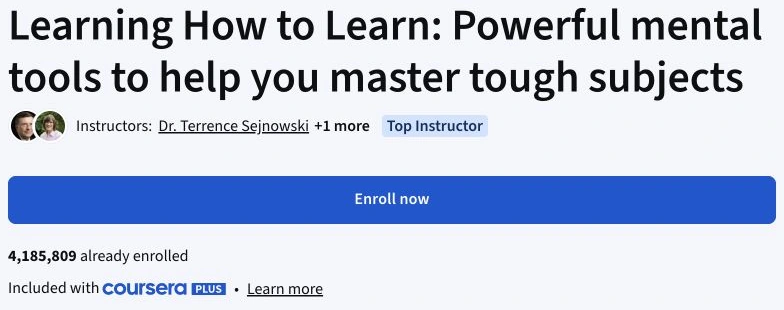
Learning How to Learn displays “Included with Coursera Plus”. Recheck the specific course before paying. A course listing or completion certificate does not by itself establish academic credit.
The public Learning How to Learn page linked its inclusion label to Coursera Plus when checked. It listed four modules, assignments and an estimated two weeks at ten hours per week. That estimate is a planning prompt, not a completion guarantee; allow time for practice and difficult material. Google IT Support is a longer professional programme, so count the full sequence and its workload rather than treating every component as a separate quick win.
Look for the Plus inclusion badge on the specific offering. Some courses and professional programmes are excluded; degrees and MasterTrack programmes are outside Plus. A university name or an advertisement for Plus on a page does not establish that the qualification is included. Record the badge, product name and checkout terms before paying.
Prices and the three payment choices
Read the plan and its conditions together
Swipe across the screenshot to inspect the detail, or open the full-size version below.
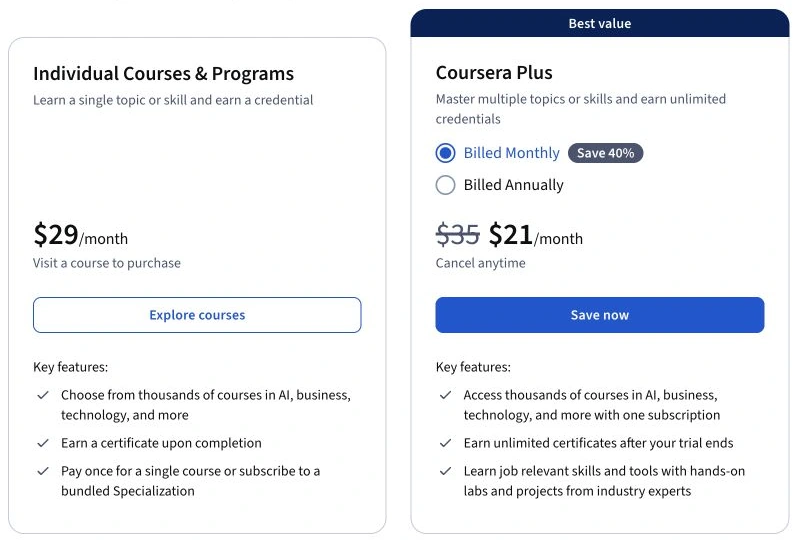
This capture illustrates what to inspect: the temporary price, normal recurring price, included access and cancellation terms. The older US$59/US$399 comparison below remains a dated arithmetic example, not this regional offer.
The US$59 monthly and US$399 annual figures below are historical inputs recorded on 9 September 2026, not a current quotation. On 28 September, the public Plus page displayed a regional price in Japanese yen; it did not establish a current US or UK checkout total for this review. I would compare the full monthly and annual charges shown to you, including tax, before paying. Do not use the earlier September promotion as a current offer: its stated end date was 23 September.
For a single course or programme, inspect the actual checkout: it may offer a one-time payment or a separate subscription. Do not assume every course has the same price or payment model. Compare identical access and certificate requirements. Existing separate subscriptions do not automatically disappear when you buy Plus.
| Option | When to compare it | Main risk |
|---|---|---|
| Individual purchase or programme subscription | One defined course or a single programme | A monthly programme still costs more if completion takes longer |
| Plus monthly | A short period covering several eligible courses | Unused months and automatic renewal |
| Plus annual | Sustained use across much of the year | Paying upfront for a plan you abandon |
Three hypothetical part-time schedules
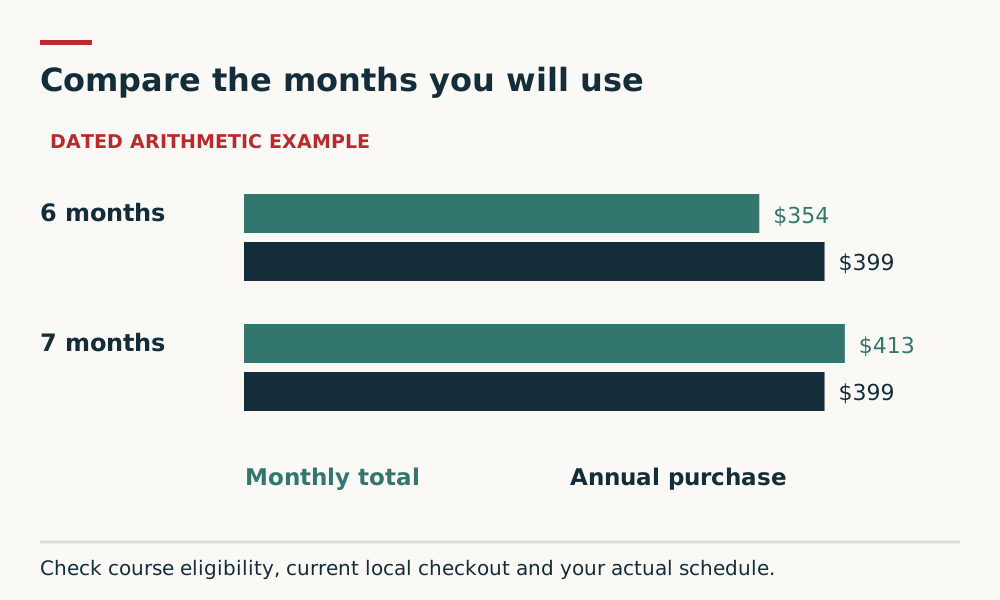
Assume each short course needs 20 hours including practice, four study weeks per planning month, and only completed courses count. The examples use the historical US price inputs recorded on 9 September 2026, excluding tax, promotions, exchange rates and any separate exam fees. They do not model the longer Google IT Support programme. Monthly cost is US$59 × paid months; cost per completed course is total cost ÷ completions. The annual column assumes buying a full year even if the plan ends sooner.
| Study plan | Assumed completions | Monthly total / per course | Annual total / per course | Individual-payment comparison |
|---|---|---|---|---|
| 5 hours/week for 1 month | 1 course (20 hours) | US$59 / US$59 | US$399 / US$399 | Choose the eligible individual option if its total is below US$59 |
| 2.5 hours/week for 6 months | 3 courses (60 hours) | US$354 / US$118 | US$399 / US$133 | Compare the actual combined individual total with US$354 |
| 5 hours/week for 12 months | 12 courses (240 hours) | US$708 / US$59 | US$399 / US$33.25 | Compare the actual combined individual total with US$399 |
What the numbers mean for your decision
Using the dated US$59 and US$399 inputs, six monthly payments total US$354 and seven total US$413. Annual billing is cheaper than uninterrupted monthly billing from the seventh paid month in that example. It may still cost more than a short subscription, an individual course or free study. With your own verified prices, compare annual charge A with monthly charge M × paid months; include introductory and renewal periods separately if they differ.
The slow three-course learner pays twice as much per completion as the one-month learner in the regular-price example. Time matters as much as catalogue size. If the year-long learner finishes only six courses, annual cost rises to US$66.50 each; if none are completed, there is no meaningful cost-per-completion figure. Add an interruption allowance before buying.
After checking inclusion and the alternative total, Coursera Plus is a reasonable option when it funds work already scheduled in your calendar. Subscription value is a judgement about your plan, not a general ranking of platforms.
Which alternative wins for your learning plan?
For several included courses over a sustained period, Plus is my subscription shortlist choice. For just one defined course, compare its actual individual access charge first. For a short creative layout project, the named Skillshare class in our comparison has a narrower scope that may be easier to act on, but its full regional membership charge still matters.
OpenLearn is my first option for free subject exploration when a personal tutor or formal credit is not required. It is not an equivalent credential purchase. These recommendations compare access to a learning task, not measured platform teaching quality.
I would not name an overall price winner between Coursera and Skillshare without the same learner’s regional checkout totals for the same intended study period. The useful decision is still clear: choose one outcome, verify the course and support, then buy the smallest suitable commitment.
Wait if your intended course is excluded, you need an accredited qualification or external exam, or you cannot protect regular study time. Check employer or institution access before paying personally. A free sample can help you judge pace and accessibility, but it cannot establish the quality of unseen assessment or feedback.
Trials, cancellation and refunds
Check trial availability at your own checkout. The Plus page describes a seven-day monthly trial, while the general terms make trial availability and duration checkout-dependent. Certificates require paid access after the trial. Subscriptions renew automatically; cancel through My Purchases or support before the next charge. Cancellation normally leaves access until the paid period ends.
Coursera’s current terms state a 14-day refund period for annual Plus, subject to the terms and applicable rights. Its Plus FAQ says certificates earned in that period are revoked if you refund. Cancelling renewal is not the same as requesting a refund; annual renewal charges are normally non-refundable under the published terms. Check the rules for your purchase and any local rights, and request a refund separately where required. Purchases through a marketplace follow its refund process.
Before you subscribe
Consider Coursera Plus only after those checks. If the budget or schedule does not work, start with the smallest useful learning task and reconsider after completing it.
- Name one outcome you can demonstrate.
- Verify inclusion for every intended offering.
- Compare the actual checkout totals in your currency.
- Block study and review time, with an allowance for interruptions.
- Record the renewal date and cancellation route.
Setup, learner access and privacy checks
The intended course and its prerequisites matter more than the subscription catalogue. This assessment is for a self-directed part-time learning plan; it is not a recommendation for an age group or evidence of child suitability.
Check the specific course’s required software, device or browser, assessment format, caption or transcript provision and access on the device you will use. The retained evidence does not establish assistive-technology compatibility, parental controls or a privacy audit.
These are material checks before purchase, not features independently verified by this update. Existing captures and product-source checks retain their stated dates; this editorial update adds suitability and evidence limits. If a required condition cannot be confirmed, choose a different resource or resolve it before paying.
Sources and further reading
- Coursera Plus: current access terms; historical US arithmetic inputs dated 9 September (accessed 28 September 2026)
- Coursera Terms of Use: subscriptions, cancellation and refunds (accessed 28 September 2026)
- Learning How to Learn: public course outline (accessed 28 September 2026)
- Google IT Support: public programme outline (accessed 23 September 2026)
- OpenLearn: understanding statements of participation (accessed 9 September 2026)
- OpenLearn: free study, tutor and credit limitations (accessed 23 September 2026)
Access dates are recorded beside each source. Please report a source or factual concern.